
Life Alert Alternatives, Better Systems, No 3-Year Contract
Life Alert charges $49.95/month, locks you into a 3-year contract, and does not include fall detection as standard. Every alternative on this list costs less, has no contract, and uses newer technology.
Last updated: April 2026 · By the AgeInPlaceGuide team
We may earn a commission if you buy through links on this page, at no extra cost to you. It never changes what we recommend. This is general information, not medical advice.
Bay Alarm Medical and Medical Guardian pricing checked August 2026 at the vendor's own site. Vendor pricing and plan names change, so confirm before you buy.
Why People Leave Life Alert
- 3-year contract, the longest in the industry. No competitor requires more than month-to-month.
- $49.95/month, when Bay Alarm Medical starts at $27.95.
- $200+ cancellation fee, even if your parent passes away or moves to assisted living.
- Outdated equipment, no smartwatch, limited mobile options, no app for family check-ins.
Life Alert vs. Top Alternatives
| Feature | Life Alert | Medical Guardian | Bay Alarm |
|---|---|---|---|
| Monthly cost | $49.95 | Not published | $27.95 |
| Contract length | 3 years | None | None |
| Cancellation fee | $200+ | $0 | $0 |
| Equipment fee | $95-$198 | By quote | $0 home, $149-$199 mobile |
| Fall detection | Not standard | Add-on, by quote | +$10/mo |
| Mobile GPS | Extra cost | Yes | Yes |
| Trial or refund | None | Not published | 15-day trial |
| Device options | 1 (pendant) | 4+ types | 4 types |
Our Top Alternatives
#1 Best Overall
Medical Guardian
Price not published
Pros
- Publishes a response-time goal, unlike Life Alert
- Multiple device types: home base, mobile GPS, smartwatch
- Fall detection available on all plan types
- No long-term contract, cancel any month
- 24/7 US-based monitoring centers
Cons
- Monthly price is not published, you have to ask for a quote
- Fall detection is an add-on that costs extra
- Mobile device battery lasts about 5 days (not 7 as claimed)
- Customer service reviews are mixed, better at sales than support
Our Take
Medical Guardian is our top recommendation for most families switching from Life Alert. You get newer devices, fall detection, and no contract. It does not publish its monthly price, so get a written quote and compare. The mobile GPS unit is what most people need.
#2 Best Value
Bay Alarm Medical
$27.95/mo
Pros
- Home system from $27.95/mo on a landline
- No activation fee, and the home base station is lent free
- 15-day risk-free trial
- GPS tracking on mobile units with location sharing
- Simple setup, plug in and press the button
Cons
- Fall detection is $10/mo extra, and mobile devices must be bought ($149 to $199 list)
- Fewer device style options than Medical Guardian
- Landline plan requires an active phone line
Our Take
Bay Alarm Medical is the best choice if cost is the deciding factor. At $27.95/mo for the landline home system, a family paying $49.95/mo for Life Alert saves about $264 a year. The 15-day risk-free trial removes all risk.
#3 Cheapest
Medical Alert (medicalalert.com)
$19.95/mo
Pros
- Lowest starting price at $19.95/mo for a home-only system
- Fall detection available on home and mobile plans
- Locked pricing, your rate stays the same (Life Alert raises prices)
- Spouse can use the same system at no extra monthly cost
Cons
- Home-only plan uses a landline or cellular base, range limited to 600 ft
- Less well-known brand, some seniors resist unfamiliar names
- Mobile plan jumps to $34.95/mo with fall detection
- Customer service is phone-only, no chat or email support
Our Take
Medical Alert is the cheapest entry point. The $19.95/mo home plan works for someone who rarely leaves the house and just needs a pendant near the bed or bathroom. The locked pricing is a real advantage, Life Alert has raised prices on existing customers.
#4 Most Modern
GetSafe
$24.95/mo
Pros
- Wall-mounted buttons with built-in fall detection, no pendant needed
- Voice-activated: just say "call for help" near any hub
- No wearable required, great for seniors who refuse to wear a pendant
- Activity monitoring alerts family members if routines change
- Modern design that does not look like medical equipment
Cons
- No mobile/GPS option, home-only system
- Requires WiFi, will not work during internet outages (no cellular backup on base plan)
- New company with less track record than Medical Guardian or Bay Alarm
- Wall sensors must be placed in each room, more setup time
Our Take
GetSafe is the best option when the senior refuses to wear a pendant. The wall-mounted sensors detect falls automatically and the voice activation means they just have to call out. The trade-off: it only works at home, and you need reliable WiFi.
#5 Tech-Savvy Pick
Apple Watch (with fall detection)
Watch price on Amazon, plus $9.99/mo cellular
Pros
- Automatic fall detection calls 911 if you do not respond in 60 seconds
- Already a watch, no stigma of wearing a medical device
- GPS tracking, heart rate, ECG, blood oxygen built in
- Works anywhere with cellular signal, not limited to home
Cons
- Must charge every 18-36 hours, dead battery = no protection
- Not practical for seniors with dementia or limited tech comfort
- No 24/7 monitoring center, calls 911 directly, not a trained operator
- Falls detection accuracy is good but not perfect, can miss slow falls
- Watch plus cellular over 3 years can cost more than some home systems
Our Take
The Apple Watch works for active, tech-comfortable seniors who would never wear a medical alert pendant. The fall detection is real and has saved lives. But it is not a replacement for a monitored system, there is no trained operator on the other end, just a 911 call. Read our full Apple Watch fall detection guide for details.
3-Year Cost Comparison
Since Life Alert locks you in for 3 years, here is what each system costs over that same period, including equipment fees.
Life Alert
Bay Alarm Medical
Medical Alert
GetSafe
*Includes monthly fees x 36 months + one-time equipment/setup costs. Fall detection add-ons not included. Medical Guardian is left out because it does not publish its prices.
Common Questions
Why are people leaving Life Alert?+
Three reasons: the 3-year contract, the $49.95/month price, and the outdated equipment. Competitors offer the same monitoring at half the price with no contract and newer devices. Life Alert also does not include fall detection as standard, you pay extra for it.
How do I cancel Life Alert?+
Call Life Alert customer service and request cancellation. You will need to return the equipment. If you are still in the 3-year contract, expect a cancellation fee (varies, but typically $200-$500). If the contract has ended, you can cancel anytime. Get cancellation confirmation in writing. Some families report that Life Alert makes cancellation difficult, be firm and document everything.
Is Medical Guardian better than Life Alert?+
Yes, for most families. Medical Guardian has no long-term contract, offers more device types, and includes fall detection as an add-on on every plan. Life Alert's only advantage is brand recognition. Medical Guardian publishes a response-time goal; Life Alert does not publish one.
Do any of these work without WiFi?+
Yes. Medical Guardian, Bay Alarm, and Medical Alert all offer cellular-based systems that work without WiFi or a landline. They use AT&T or Verizon cellular networks. GetSafe requires WiFi. The Apple Watch needs cellular (separate plan) or WiFi.
Which system is best for someone with dementia?+
Medical Guardian or Bay Alarm with a GPS mobile unit. The pendant works as a wearable tracker, family members can see the person's location. Some units also have a geo-fencing feature that alerts you if the wearer leaves a set area. Avoid the Apple Watch for dementia, it requires too much user interaction.
The Bottom Line
Every system on this list beats Life Alert on price, contract terms, and technology. Medical Guardian is the best all-around replacement. Bay Alarm Medical is the best if cost matters most. GetSafeis the answer when Mom won't wear a pendant.
Switching saves $300-$1,000 per year. There is no reason to stay on a 3-year contract when month-to-month systems perform just as well.

What you can buy today
Three alternatives whose hardware you can buy today. The monitoring plan is still monthly.
We may earn a commission if you buy through links on this page, at no extra cost to you. It never changes what we recommend. This is general information, not medical advice.

Medical Guardian MGMove Smartwatch
24/7 monitoring centre, needs a plan
Reaches a monitoring centre that can send an ambulance. The watch is bought once, the plan is monthly.
Check price on Amazon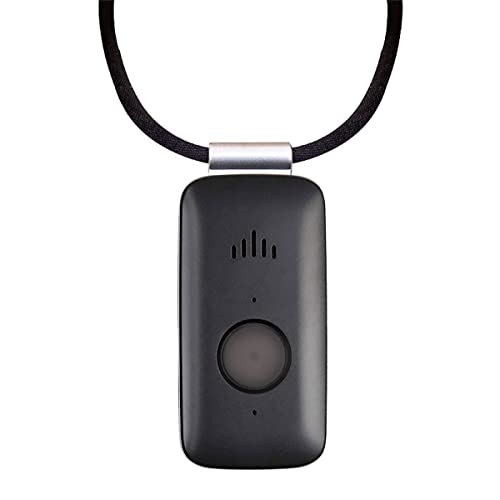
Mini Guardian 4G Medical Alert
4G, worn on the body, needs a plan
A small button worn on the body. Presses through to a monitoring centre.
Check price on Amazon
Medical Guardian MGHome Cellular
In-home base unit, needs a plan
An in-home unit for someone who does not go out much. No landline needed.
Check price on Amazon
These are supplies, not the job itself. Amazon does not sell the labour, the permit or the inspection.