
Medical Guardian Review (2026): What You Pay and Who Gets the Alert
April 16, 2026 · 7 min read
We may earn a commission if you buy through links on this page, at no extra cost to you. It never changes what we recommend. This is general information, not medical advice.
Medical Guardian pricing checked August 2026 at the vendor's own site. Vendor pricing and plan names change, so confirm before you buy.
What Medical Guardian Does Well
They Publish a Response Goal
We have not timed emergency calls, and neither has any review site we have found that shows its working. Treat any page quoting an exact number of seconds with suspicion unless it shows you the data.
What you can check is whether a company will commit to a target in writing. Medical Guardian publishes a response goal. Life Alert does not publish one. That is a real difference, and it is the kind you can hold a company to.
More Device Styles Than Any Other Brand
Medical Guardian has more styles than any other brand. Home base, mobile clip, wrist button, and a watch-style device. That matters. People are picky about what they will wear. More options means a better chance of a fit.
The Mini Guardian is the most popular. Clips to a belt or pocket. GPS, fall help, and two-way voice. Battery lasts about 5 days.
The App Is Actually Useful
The app shows the device's last spot, battery level, and activity. You get an alert if the button is pressed. Check if the device was charged recently. That tells you if your parent is wearing it.
Setup Experience
Setup is a phone call, not a technical job. You call the number on the card, give them the serial number, and add your contacts. Then you press the button and run a real test with a live agent.
Do that test with your parent in the room. The agent walks through who gets called and in what order. It is the step families skip, and it is the one that turns a gadget in a box into something your parent believes will work.
The app is straightforward. Enter your account number and you see the device on a map, with battery level and last known position. It looks dated, and it does the job.
Fall Detection Accuracy
False alarms happen with every fall-detection device. A dropped pendant, sitting down hard, or a nearby jolt can all trigger one. Medical Guardian handles this the way the better systems do: the device asks "Are you OK?" and waits before it calls an agent, so answering stops the call.
Be clear about the limit. These devices detect a sharp change in motion, so they catch most falls from standing and they miss slow ones, like sliding out of a chair onto the floor. Every fall-detection device on the market shares that limit. It is not a Medical Guardian flaw, it is physics, and no vendor can engineer around it. Fall detection is a backstop, not a guarantee, and nobody should stop checking on a parent because they are wearing one.
What Medical Guardian Gets Wrong
The Battery Claim Is Too High
The advertised figure is an up-to number measured in the kindest conditions. Caregivers consistently report less once GPS and fall detection are both on. Plan on charging it every few days rather than weekly, and build the charge into a daily routine so it is never the thing that got forgotten.
Post-Sale Support Is Uneven
Pre-sale and billing support get consistently good reports. Replacement parts are where complaints cluster: a failed charger or a dead base unit can take several calls and more than a week to resolve.
The pattern is common across reviews. The sales team is fast because it is a sales channel. Post-sale help depends on who you reach, so keep the account number somewhere findable before you need it.
Fall Help Costs Extra
Fall help is an add-on, so it costs more than the base plan. Medical Guardian does not publish its plan prices, so ask what the plan costs with fall help included. Bay Alarm publishes its fall help price: $10 a month on top of any plan.
Pricing Breakdown
Medical Guardian does not publish monthly prices on its site. Plans are quoted by phone. These are the plans it lists:
| Plan | Monthly |
|---|---|
| Guardian Flex | Not published |
| MG Move | Not published |
| MG Home Cellular | Not published |
| MG Home Landline | Not published |
Ask for the monthly price, the equipment fee and the cancellation terms in writing before you pay. No long-term contract is required on any plan.
Medical Guardian vs. Bay Alarm Medical
Most families end up deciding between these two. Here is the side-by-side.
| Medical Guardian | Bay Alarm | |
|---|---|---|
| Starting price | Not published | $27.95/mo |
| Fall detection | Add-on, price by quote | Included |
| Device styles | 4 options | 2 options |
| Trial or refund | Not published | 15-day trial |
Bay Alarm wins on clear pricing. Medical Guardian wins on choice of device. If your parent is picky about what they will wear, the extra styles matter. If they are not, Bay Alarm publishes its price and you can check it before you call anyone.
The Bottom Line
Medical Guardian is the pick here for one reason: it sells more shapes of device than anyone else, and the device your parent will actually wear is the one that works. It does not publish its price, so you cannot compare it with Bay Alarm Medical until you have a quote. What you get is choice of hardware, not a proven speed advantage.
Two things fall short. The battery does not last as long as they say. Post-sale help is hit-or-miss. Neither kills the deal. But know about both going in.
If your parent needs a full medical alert with GPS and fall help, Medical Guardian is our top pick. If price is the goal, Bay Alarm Medical publishes its prices and has the same core features.

What you can buy today
The three Medical Guardian devices sold on Amazon. The monitoring plan is separate and comes from Medical Guardian.
We may earn a commission if you buy through links on this page, at no extra cost to you. It never changes what we recommend. This is general information, not medical advice.

Medical Guardian MGMove Smartwatch
24/7 monitoring centre, needs a plan
Reaches a monitoring centre that can send an ambulance. The watch is bought once, the plan is monthly.
Check price on Amazon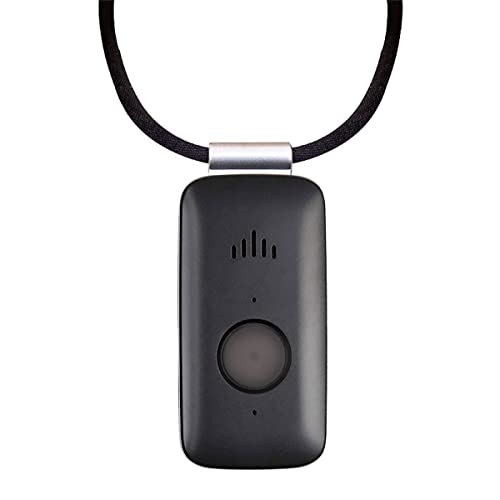
Mini Guardian 4G Medical Alert
4G, worn on the body, needs a plan
A small button worn on the body. Presses through to a monitoring centre.
Check price on Amazon
Medical Guardian MGHome Cellular
In-home base unit, needs a plan
An in-home unit for someone who does not go out much. No landline needed.
Check price on Amazon
These are supplies, not the job itself. Amazon does not sell the labour, the permit or the inspection.