
This page is for informational purposes only. It is not medical advice. Talk to your doctor before making health decisions for yourself or a loved one.
How to Set Up Apple Watch Fall Detection
Fall detection is off by default on most Apple Watches. Here is how to turn it on and set it up correctly, including emergency contacts and Medical ID.
Last reviewed: May 2026
What you need before starting
- ✓Apple Watch Series 4 or later. The models Apple sells today are the SE 3, Series 11 and Ultra 3
- ✓watchOS 8 or later (Settings on iPhone: General, Software Update to check)
- ✓iPhone 6s or later with iOS 17 or later
- ✓The Watch app installed on the iPhone (pre-installed on all iPhones)
Step-by-step setup
Open the Watch app on iPhone
The Watch app has a black icon with a watch face. Tap it to open. Make sure the watch is paired and showing as connected.
Tap Emergency SOS
Scroll down the Watch app main screen until you see Emergency SOS. Tap it.
Toggle Fall Detection on
You will see a Fall Detection toggle. Tap it to turn it green. If the toggle is grayed out, see the troubleshooting section below.
Add emergency contacts
On the iPhone, open the Health app. Tap the profile photo in the top right corner. Tap Medical ID. Scroll to Emergency Contacts and add at least two people. After a fall alert fires, the watch texts these people automatically with a location map.
Fill out Medical ID
Still in the Health app, complete the Medical ID fields: blood type, known conditions, current medications, and allergies. This information appears on the watch lock screen and is accessible to paramedics even when the iPhone is locked.
Check the fit
Apple recommends the watch fit snugly, about one finger width above the wrist bone. A loose watch may not detect the impact of a fall correctly. The back sensors also need light contact with skin for heart rate monitoring.
Optional: turn on Always On display
For seniors, the always-on display makes it easier to read the watch face and to see a fall alert countdown without having to raise the wrist. Go to Watch app, Display and Brightness, and toggle Always On. Note: this reduces battery life by about 2 hours.
Troubleshooting
Fall detection toggle is grayed out
Apple grays out the toggle for Apple ID accounts set to age under 55. Tap the grayed toggle. A confirmation prompt appears asking if you want to enable it anyway. Tap Enable.
Watch is not detecting falls during testing
Apple does not recommend trying to force a fall detection test. The algorithm requires a genuine impact. Lying down quickly and waving your wrist rarely triggers it. Trust that it is working. If you want to verify, Apple has a published support article on what triggers and what does not.
Too many false alarms during workouts
Newer models have much better workout detection and fewer false alarms. If your parent has an older model and gets frequent false alerts, it may be worth upgrading. You can also tell the watch you are starting a workout (open the Workout app) and it adjusts sensitivity during that session.
Emergency contacts are not getting texts after a test
The watch only texts emergency contacts when a real fall alert fires and the 60-second countdown completes. Dismissing the alert manually stops the texts. This is correct behavior. Do not try to force it to fire to test the texts, because that would actually call 911.
What fall detection does not cover
Fall detection works when the watch is worn. If your parent takes it off to shower, they have no coverage during that time. For full-day coverage, consider pairing the watch with a waterproof medical alert button for the shower. Bay Alarm Medical has a waterproof lanyard option from $27.95/month.
Also, the GPS model of Apple Watch needs the iPhone within Bluetooth range to call 911 via cellular. If your parent leaves the iPhone at home and falls down the street, the GPS model may not connect. The cellular Apple Watch at $499 solves this.
Frequently asked questions
What Apple Watch do I need for fall detection?
Series 4 or later. That includes Series 4 through 11, the SE 2nd and 3rd generation, and every Ultra. The original Series 1, 2, and 3 do not have it. You also need watchOS 8 or later installed.
Why is the fall detection toggle grayed out?
Apple disables fall detection by default for Apple ID accounts with an age below 55. Go to the Watch app, then Emergency SOS. If the toggle is grayed out, look for a note about age. You can still turn it on manually. Tap the toggle and confirm you want to enable it.
How do I add emergency contacts to Apple Watch?
Open the Health app on your iPhone. Tap your profile photo in the top right. Tap Medical ID. Scroll to Emergency Contacts and tap the plus button. Add at least two people. The watch automatically texts these contacts after a fall alert fires.
Will fall detection call 911 during a workout?
It can, but the watch gives you 60 seconds to cancel. During vigorous workouts with Series 4 through 8, false alarms are more common. Newer models have a better algorithm that distinguishes exercise movement from a real fall. If you do heavy workouts, update to the newest watch or expect occasional false alerts.
Does fall detection work if the watch is in always-on display mode?
Yes. Always-on display does not affect fall detection. The sensors run continuously regardless of display mode. Always-on display is actually useful for seniors because the large watch face is visible at a glance.

What you can buy today
Setup works the same on every model that has fall detection. These are the current two.
We may earn a commission if you buy through links on this page, at no extra cost to you. It never changes what we recommend. This is general information, not medical advice.

Apple Watch Series 11 (GPS, 46mm)
Fall detection, needs an iPhone
Calls emergency services after a hard fall if you do not respond. Needs a paired iPhone in range for calls.
Check price on Amazon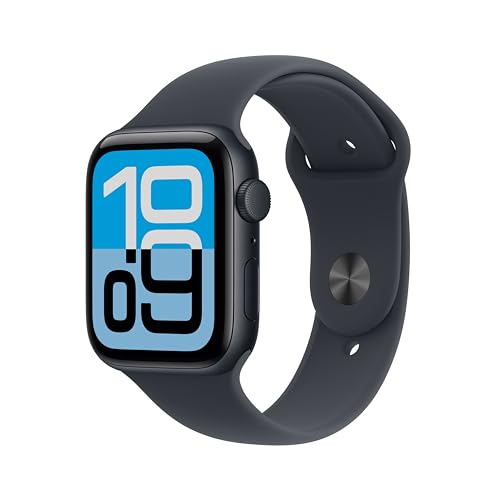
Apple Watch SE 3 (GPS, 44mm)
Fall detection, needs an iPhone
The cheaper Apple Watch with the same fall detection. Still needs a paired iPhone.
Check price on Amazon
These are supplies, not the job itself. Amazon does not sell the labour, the permit or the inspection.