
This page is for informational purposes only. It is not medical advice. Talk to your doctor before making health decisions for yourself or a loved one.
Apple Watch vs. Medical Alert System for Seniors
Both can detect a fall and call for help. But they work very differently. Here is a direct comparison of cost, monitoring, and real-world fit for seniors.
Last reviewed: May 2026
Head-to-head comparison
| Feature | Apple Watch Series 10 | Bay Alarm Medical | Medical Guardian | Life Alert |
|---|---|---|---|---|
| Monthly cost | $0 (or $10/mo cellular) | $27.95 to $39.95/mo | Not published | $49.95/mo |
| Device cost | $399 | $0 home, $149-$199 mobile | By quote | $198 activation |
| Requires iPhone? | Yes (for GPS model) | No | No | No |
| Standalone cellular? | Yes (cellular model, $499+) | Yes | Yes | Landline base + mobile add-on |
| Auto fall detection? | Yes | Yes (+$10/mo) | Yes (add-on) | No (button press only) |
| GPS tracking? | Yes | Yes (mobile plans) | Yes | Mobile add-on only |
| Battery life | 18 hours (36 low-power) | Up to 5 days | Up to 5 days | Home unit: plugged in |
| 24/7 monitoring center? | No (calls 911 directly) | Yes | Yes | Yes |
| Works outside WiFi? | Yes (cellular model) / iPhone needed (GPS) | Yes, 4G LTE | Yes, 4G LTE | Yes |
When Apple Watch wins
Apple Watch is the right call if your parent already has an iPhone and actually uses it. The setup is familiar. They do not have to learn a new device. And over three years, it costs far less.
It also wins on health features. ECG, blood oxygen monitoring, irregular heart rhythm alerts, and crash detection are not available on any dedicated medical alert at any price.
For active seniors who hike, swim, or travel, Apple Watch's GPS and cellular work anywhere. No monthly contract. No annual commitment.
When a medical alert wins
If your parent does not use a smartphone, a medical alert is the clear choice. Apple Watch needs an iPhone to function at all. You cannot buy one and hand it to a tech-averse 82-year-old and expect it to work.
Medical alerts have 24/7 operators who can talk your parent through a scary moment, check if they are okay, and decide whether to send an ambulance or just call a neighbor. Apple Watch just calls 911. That is sometimes better (faster dispatch). But a panicked senior may not be able to navigate the Apple Watch call screen.
Medical alerts also have multi-day batteries. Your parent does not need to remember to charge every night. That matters for seniors with memory concerns.
The hybrid approach
Some families do both. The Apple Watch handles daily health tracking and fall detection. A home medical alert button (the kind on a lanyard, around $20/month) provides a backup for days when the watch is charging.
That combination runs about $30-$35/month total and covers the one gap Apple Watch has: the charging window.
Three-year cost breakdown
| Option | Year 1 | Year 2 | Year 3 | Total |
|---|---|---|---|---|
| Apple Watch Series 10 (GPS) | $399 | $0 | $0 | $399 |
| Apple Watch Series 10 (cellular) | $499 + $120 | $120 | $120 | $859 |
| Bay Alarm Medical (SOS Home, landline) | $335 | $335 | $335 | $1,006 |
| Medical Guardian | By quote | By quote | By quote | By quote |
| Life Alert | $198 + $599 | $599 | $599 | $1,995 |
Prices are estimates. Medical Guardian does not publish its prices, so it has no figures here.
Frequently asked questions
Can Apple Watch replace a medical alert system?
For some seniors, yes. If your parent already uses an iPhone, is comfortable with tech, and charges the watch every night, Apple Watch covers the core fall detection need at a lower long-term cost. For seniors who want 24/7 professional monitoring or do not use a smartphone, a dedicated medical alert is a better fit.
Does Apple Watch call a monitoring center like Life Alert does?
No. Apple Watch calls 911 directly. There is no intermediary operator. Medical alert systems like Bay Alarm Medical or Medical Guardian connect you to a trained operator first, who can assess the situation, talk to your parent, and decide whether to send help.
Which is cheaper long-term: Apple Watch or a medical alert?
Apple Watch is cheaper over 3 years. A Series 10 ($399 one-time) with no cellular adds up to $399. Bay Alarm Medical at $27.95/mo for the landline home system adds up to $1,006 over three years. Life Alert at $49.95/mo adds up to $1,798 over three years plus a $198 activation fee.
What if my parent does not have an iPhone?
Apple Watch requires an iPhone. Without one, the watch does not work for fall detection at all. In that case, a dedicated medical alert system is the only real option.
Is the cellular Apple Watch worth it for fall detection?
It depends on whether your parent is often away from their iPhone. If they are home most of the day, the GPS model at $399 is fine. If they walk the neighborhood, travel, or are active away from home, the cellular model at $499 plus $10/mo adds meaningful coverage.

What you can buy today
These are the current Apple Watch models. A monitored medical alert is a plan, not a purchase, and is sold direct.
We may earn a commission if you buy through links on this page, at no extra cost to you. It never changes what we recommend. This is general information, not medical advice.

Apple Watch Series 11 (GPS, 46mm)
Fall detection, needs an iPhone
Calls emergency services after a hard fall if you do not respond. Needs a paired iPhone in range for calls.
Check price on Amazon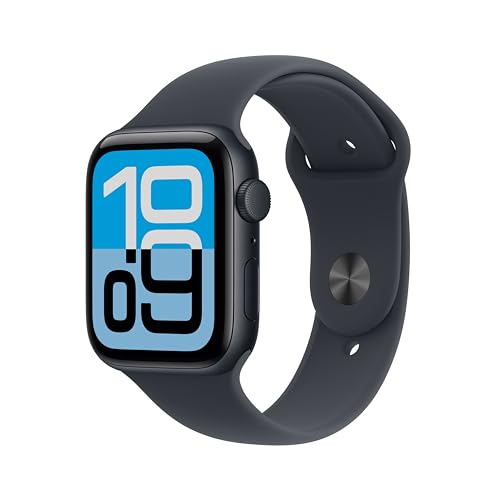
Apple Watch SE 3 (GPS, 44mm)
Fall detection, needs an iPhone
The cheaper Apple Watch with the same fall detection. Still needs a paired iPhone.
Check price on Amazon
These are supplies, not the job itself. Amazon does not sell the labour, the permit or the inspection.