
Smart Home Technology for Seniors, What Actually Helps (2026)
The best smart home upgrades for aging in place are not the flashiest ones. They are the ones that solve real daily problems, nighttime falls, unknown visitors, forgotten alarms, and slow water leaks, without requiring the senior to learn new technology.
Last updated: April 2026 · By the AgeInPlaceGuide team
We may earn a commission if you buy through links on this page, at no extra cost to you. It never changes what we recommend. This is general information, not medical advice.
Start With These 3, Highest Impact, Lowest Learning Curve
If you can only do three things right now, these address the highest-risk scenarios:
- 1.Motion-activated night lights in hallways and the path to the bathroom, eliminates the most common cause of nighttime falls
- 2.Smart smoke and CO detector, you get an instant phone alert, and the voice announcement is far more useful for elderly users than a beep
- 3.Video doorbell, your parent can screen visitors from their chair; you can monitor remotely and answer on their behalf
All three operate automatically or with simple voice commands after initial setup.
5 Smart Home Categories That Make a Real Difference
Smart Lighting
Prevents nighttime falls automatically
The person gets up in darkness, reaches for a wall switch they cannot find, and falls. Motion-activated lighting removes that hazard entirely, the light comes on before they take a step.
Core benefit for caregivers: Motion-activated lights turn on automatically when your parent gets up at night, no fumbling for switches in the dark.

Govee Smart LED Strip Lights
See price on Amazon
Pros
- Stick under bed or along baseboard, creates automatic floor-level path lighting
- Motion sensor mode: off until movement detected
- Dim amber mode for night use, no harsh blue light disrupting sleep
Cons
- Requires WiFi setup, initial install may need a family member's help
- Adhesive can fail on some wall types
Our verdict: Run these along the baseboard from the bedroom to the bathroom and set to motion-activated, dim amber. When they get up at night, the path lights up automatically.

Lutron Caseta Smart Switch
See price on Amazon
Pros
- Replaces standard wall switch, works without any hub or smart home system
- Voice control via Alexa, Google, Apple HomeKit
- Gradual dimming: no harsh bright-light shock at night
Cons
- Requires neutral wire in older homes, check before buying
- Higher upfront cost than basic smart plugs
Our verdict: The most reliable smart switch on the market, works with every major voice assistant and does not require a separate hub. Set bathroom and hallway lights to motion-activated dim mode at night.
Video Doorbell
Safety and independence at the front door
Getting up quickly to answer a door is a fall risk. Opening a door to an unknown visitor is a safety risk. A video doorbell solves both, your parent can screen visitors from their chair, and you can monitor the front door remotely and answer on their behalf if needed.
Core benefit for caregivers: See and speak to anyone at the door without getting up. Caregiver children can also monitor from their phone remotely, they can see who rang the doorbell from anywhere.

Ring Battery Doorbell 2K
See price on Amazon
Pros
- 1080p video with two-way audio, speak to visitors without opening the door
- Motion alerts sent to family members' phones instantly
- Works with existing doorbell wiring or battery power, easy installation
- Alexa integration: Alexa announces who is at the door
Cons
- Ring Protect plan ($4.99/mo) needed for video history
- Video quality can drop in very bright sunlight
Our verdict: The most widely used video doorbell and for good reason. Straightforward setup, reliable alerts, and Alexa integration lets the senior hear 'someone is at the front door' without having to check their phone.
Smart Speaker / Voice Assistant
Hands-free calls, reminders, and home control
For seniors with arthritis, vision problems, or limited mobility, voice control is more accessible than a touchscreen. A voice assistant on the kitchen counter can set medication alarms, call family by name, play music, and check the weather, without the senior ever touching a device.
Core benefit for caregivers: Call family, set medication reminders, and control lights without touching a phone or getting up. Hands-free interaction is genuinely easier for many elderly users than smartphones.

Amazon Echo Dot (newest model)
See price on Amazon
Pros
- Largest ecosystem, most medical alert systems integrate with Alexa
- Hands-free calling to family contacts by voice
- Medication reminders, timers, and daily schedules
Cons
- Requires WiFi, useless in an outage without backup
- Amazon ended its Alexa Together caregiver plan in June 2024
- Voice recognition can struggle with soft or accented speech
Our verdict: The best voice assistant for senior caregiving. Amazon ended its Alexa Together caregiver plan on June 25, 2024, so do not buy an Echo for that plan. For 24/7 urgent help by voice, Amazon now sells a separate paid plan called Alexa Emergency Assist (Amazon's own forum and news pages, checked October 2026). The Amazon ecosystem also integrates with Bay Alarm Medical and most other medical alert systems.
Leak and Smoke Detectors
Prevents catastrophic damage with phone alerts
A forgotten pot on the stove is the #1 cause of house fires among elderly adults. A slow pipe leak under a sink can cause tens of thousands in damage before anyone notices. Smart detectors change the alert chain, instead of only screaming inside the home, they send a notification to every family member's phone within seconds.
Core benefit for caregivers: You get an alert on your phone the moment water is detected or smoke is sensed, before damage becomes catastrophic. Standard detectors only alert people inside the home.
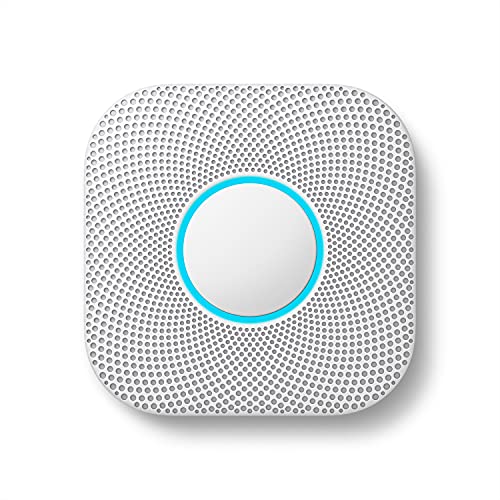
Nest Protect (Smoke + CO Detector)
See price on Amazon
Pros
- Announces alarm in plain English: 'Heads up, there is smoke in the kitchen' instead of a loud beep
- Phone alerts sent to family immediately
- Self-tests automatically, no annual button-pressing needed
- Carbon monoxide detection included
Cons
- Costs more than standard detectors
- Requires WiFi for remote alerts
Our verdict: The Nest Protect is worth the premium specifically for elderly users because of the voice announcement. 'There is smoke in the hallway, please leave the building' is far more useful for someone with hearing loss than a high-pitched alarm. Family gets the phone alert and can call immediately.
Medical Alert Integration
Smart home and medical alert working together
The most powerful smart home setup for seniors combines a voice assistant with a medical alert system. Bay Alarm Medical integrates directly with Amazon Alexa, if the person cannot reach their button, they can call for monitored help with their voice. This bridges the gap between smart home convenience and professional emergency response.
Core benefit for caregivers: Smart speakers and medical alert systems work together, your parent can say 'Alexa, call for help' and Bay Alarm Medical dispatches assistance without pressing a button.
Common Questions
What is the best voice assistant for seniors?+
Amazon Echo with Alexa is the best choice for most seniors. It has the largest ecosystem, integrates with most medical alert systems including Bay Alarm Medical. Amazon ended its Alexa Together caregiver plan on June 25, 2024. For 24/7 urgent help by voice, Amazon now sells a separate paid plan called Alexa Emergency Assist. Check its current price on Amazon before you sign up.
Is smart home technology hard for elderly people to learn?+
It depends on the device. Motion-activated devices require zero tech skills, they just work. Voice assistants take one to two days of practice for most users. Anything that requires opening an app or navigating a menu is harder and should be set up by a family member. The best senior smart home devices are set up once by a caregiver and then operate automatically.
Can smart home devices replace a caregiver?+
No. Smart home devices are supplements, not replacements. They extend independence, reduce caregiver anxiety, and catch problems earlier, but they cannot substitute for human judgment, physical assistance, or emotional support. A sensor can tell you your parent has not moved in 12 hours. It cannot assess whether they are sleeping or whether something is wrong.
What is the cost to set up a basic smart home for aging in place?+
A meaningful starter setup is motion-activated night lights, a video doorbell, a smart speaker, and leak and smoke detectors. Check each one's current price on Amazon. This covers the three highest-risk scenarios, nighttime falls, fire, and unknown visitors, without requiring technical expertise to operate.
Do smart home devices work if the internet goes out?+
Most require internet for remote alerts and voice control. Motion-activated night lights with local sensors work without internet. Nest Protect will still alarm locally without WiFi but will not send phone notifications. For critical coverage, choose devices that have local functionality as a backup, and consider keeping a battery-powered traditional smoke detector as a redundant layer.
The Bottom Line
Smart home technology is most effective when it removes friction from things your parent already does, getting up at night, answering the door, setting medication reminders. The best devices work automatically without any learning curve.
Start with the three highest-impact items: motion-activated lighting, a smart smoke detector, and a video doorbell. Add a voice assistant and medical alert integration for a comprehensive setup that covers daily convenience and emergency response.
Affiliate disclosure: AgeInPlaceGuide.com earns a commission from Amazon when you buy through links on this page, at no extra cost to you. The Bay Alarm Medical links here earn us nothing. We research products independently, and commissions do not influence what we recommend.

The part you can buy today
Not everything useful is smart. These four are simple, cheap and work without an app or a hub.
We may earn a commission if you buy through links on this page, at no extra cost to you. It never changes what we recommend. This is general information, not medical advice.

Mr. Beams MB710 Motion Night Light
15 lumens, battery, no wiring
Turns on by itself when someone walks past. Good for the route to the bathroom.
Check price on Amazon
Schlage Accent Lever Door Handle
Passage function, reversible
Push it down instead of twisting a round knob. Easier with sore hands.
Check price on Amazon
RMS Featherweight 32 in Reacher
32 in reach, 2 pack
Picks things up off the floor or a high shelf, so nobody climbs.
Check price on Amazon
DreamSky Large Display Clock
7.6 in screen, day and date
Big numbers with the day and date. Helps with medication timing.
Check price on Amazon
These are supplies, not the job itself. Amazon does not sell the labour, the permit or the inspection.