
Medical Alert Systems with No Monthly Fee, Do They Actually Work?
"No monthly fee" sounds like the answer. But most of these devices do not connect to a 24/7 monitoring center, they send alerts to family instead. Here is what that actually means and when it is good enough.
April 2026 · By the AgeInPlaceGuide team· 6 min read
What "No Monthly Fee" Actually Means
When a medical alert company advertises no monthly fee, they are almost always telling you one of two things: either the device alerts family members via a smartphone app instead of a professional monitoring center, or the emergency feature calls 911 directly without going through an operator.
Neither of those is the same as paying $25 to $45 per month for a service where a trained agent answers your button press within 30 seconds, knows your medical history, confirms your situation, and dispatches the right emergency service to the right address.
That distinction matters more than most people realize, especially at 3 AM, especially if the person has fallen and cannot speak, and especially if their adult children happen to be traveling or asleep with their phones on silent.
Who the No-Fee Option Works For
Honest answer: it works for people with specific circumstances, not for everyone. Here is how to think about it.
Good candidates for no-fee solutions
- ✓Active seniors who rarely leave the house alone and have family nearby
- ✓People who want location tracking for peace of mind, not emergency dispatch
- ✓Households where someone is home most of the time and can respond quickly
- ✓Budget-constrained families looking for any coverage vs. no coverage
When you need to pay for monitoring
- ✗They live alone, no one nearby to respond to an app alert
- ✗History of falls, strokes, or cardiac events
- ✗Dementia or cognitive decline, they may not be able to operate any device
- ✗Family members work irregular hours or travel frequently
The 2 Best No-Subscription Options
Apple AirTag
$29 one-time · No subscription
AirTag is a Bluetooth tracker that shows location to a family member via the Apple Find My app. It does not have an SOS button, does not detect falls, and does not alert anyone when a problem occurs, it only shows location when the family member checks the app.
It is excellent for one specific use case: preventing lost items. If your parent frequently misplaces their wallet, purse, or keys, AirTag is brilliant, precision finding guides you to within a few inches. As a medical alert or safety device, it has fundamental gaps.
Honest verdict: Not a medical alert device. Use it to keep track of possessions, not people. Privacy laws in many states also restrict placing covert trackers on another adult without disclosure.
Apple Watch SE (2nd Gen)
$249 one-time · No subscription for core safety features
Apple Watch SE is the strongest no-monthly-fee safety device available. When fall detection triggers or when the user manually calls for help, the watch calls 911 directly, bypassing the need for a monitoring center entirely. Emergency SOS also shares the user's GPS location with emergency services and emergency contacts automatically.
The Family Setup feature lets a caregiver manage the watch from their own iPhone, the senior does not need their own phone. This is meaningful for elderly users who do not carry smartphones.
The limitation: Apple Watch calls 911, but a 911 call requires the user or an automated voice message to communicate the situation. A monitoring center agent has your medical history, contacts, and address on file. When someone is unconscious, 911 dispatches based on GPS, which works but is slower than a monitoring center with full context.
When You Need to Pay for Monitoring
The trade is simple, even without exact numbers. A professional monitoring centre answers in under a minute because answering is the job and somebody is always on shift. When a family member is the backup, the delay is however long it takes them to notice, which could be minutes or could be the next morning, accounting for missed calls, delays in noticing the notification, and the time it takes to actually reach the person or dispatch help.
In a cardiac event or serious fall with head injury, 45 minutes is the difference between recovery and permanent damage. That is the uncomfortable reality behind the subscription fee.
The cost in perspective
Bay Alarm Medical's full monitoring plan starts at $27.95 per month, about $0.83 per day. That is the cost of a cup of coffee for professional coverage 24 hours a day, 365 days a year, from people whose only job is to respond when something goes wrong. For a senior who lives alone, this is not an optional expense, it is essential infrastructure.
If budget is genuinely the barrier, a watch that calls 911 is better than nothing. But if there is any way to budget $28 per month, the full monitoring plan is worth every dollar.
Ready to Compare Full Medical Alert Systems?
Bay Alarm Medical is our top-rated monitored medical alert system, starting at $27.95/month with no long-term contract. Read the full review for pricing tiers, device options, and how it compares to Life Alert.
Common Questions
Is there a medical alert with no monthly fee and no contract?+
The Apple Watch SE comes closest. It has a one-time $249 cost and calls 911 directly with no ongoing fees, but there is no monitoring center standing by. Bay Alarm Medical's family app is free, but only alongside one of its paid plans.
Does Apple Watch work as a medical alert system?+
Yes for direct emergency calls and fall detection, Apple Watch can call 911 automatically if a hard fall is detected and the user does not respond within 30 seconds. No for professional monitoring: there is no 24/7 call center agent who responds in seconds and dispatches help. If your parent is unconscious and family does not answer their phone, help does not come automatically.
What is the cheapest real medical alert system?+
Bay Alarm Medical starts at $27.95 per month for in-home monitoring, one of the lowest prices available from a company with actual 24/7 monitoring center coverage. For mobile GPS monitoring outside the home, the SOS Micro is $34.95 per month.
Can a family member monitor without paying?+
Yes. Most medical alert companies offer a companion app for family members to see location and receive alerts at no extra cost. What the subscription covers is the professional monitoring center, trained agents who answer within 30 seconds and can dispatch EMS. Family monitoring via app is free but depends on a family member being available and awake.
What is the difference between monitored and unmonitored?+
Monitored: when the button is pressed or a fall is detected, a 24/7 call center agent responds within approximately 30 seconds, confirms the situation, and dispatches police, fire, or EMS. Unmonitored: an alert goes to family members via their smartphone app. The difference matters most when the person is unconscious, when it is 3 AM, or when family members are unavailable to answer.
Affiliate disclosure: AgeInPlaceGuide.com earns a commission from Amazon when you buy through links on this page, at no extra cost to you. The Bay Alarm Medical links here earn us nothing. Commissions do not influence our recommendations or our editorial coverage.

What you can buy today
Every monitored system needs a plan. These three let you at least buy the hardware once, rather than renting it.
We may earn a commission if you buy through links on this page, at no extra cost to you. It never changes what we recommend. This is general information, not medical advice.

Medical Guardian MGMove Smartwatch
24/7 monitoring centre, needs a plan
Reaches a monitoring centre that can send an ambulance. The watch is bought once, the plan is monthly.
Check price on Amazon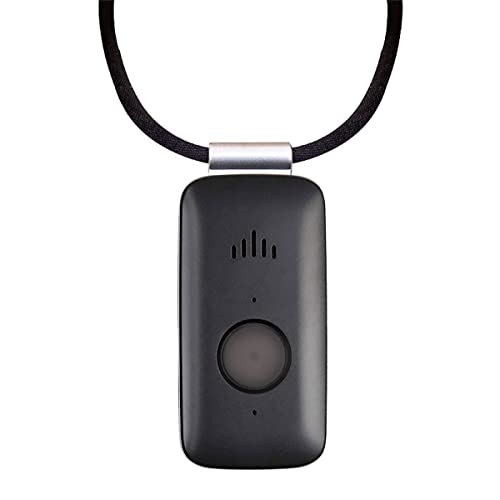
Mini Guardian 4G Medical Alert
4G, worn on the body, needs a plan
A small button worn on the body. Presses through to a monitoring centre.
Check price on Amazon
Medical Guardian MGHome Cellular
In-home base unit, needs a plan
An in-home unit for someone who does not go out much. No landline needed.
Check price on Amazon
These are supplies, not the job itself. Amazon does not sell the labour, the permit or the inspection.