
Bay Alarm Medical Review (2026), Honest Look at Plans, Hardware, and Response Times
April 2026 · 9 min read
We may earn a commission if you buy through links on this page, at no extra cost to you. It never changes what we recommend. This is general information, not medical advice.
Bay Alarm Medical pricing checked October 2026 at the vendor's own site. Vendor pricing and plan names change, so confirm before you buy.
Plans and Pricing
Bay Alarm Medical has four plans. The right one depends on whether your parent leaves the house and whether they still have a landline.
SOS Home
Base station with a wrist or pendant button. For someone who is mostly at home. The price shown is the landline version.
Landline. The cellular version is $34.95 a month.
$27.95/mo
$335/yr annually
$44.95/mo with fall detection
Base station lent free
SOS All-In-One 2
Most PopularHome base and a mobile button in one plan, so the same account covers both.
$34.95/mo
$419/yr annually
$44.95/mo with fall detection
Device to buy: $149 list
SOS Micro
A small mobile button you take out with you. No base station needed. Bay Alarm lists Wi-Fi and cell location for it, not GPS.
$34.95/mo
$419/yr annually
$44.95/mo with fall detection
Device to buy: $149 list
SOS Smartwatch
Looks like a watch rather than a medical device, which is often the whole objection.
$39.95/mo
$479/yr annually
$49.95/mo with fall detection
Device to buy: $199 list
What the hardware costs. The SOS Home base station, wrist button and pendant are lent free. The three mobile devices have to be bought: $149 list for the All-In-One 2 and the Micro, $199 list for the Smartwatch. Bay Alarm often discounts these, so check the price on the day. Fall detection adds $10 a month on any device, and on SOS Home it also needs a $30 button.
Hardware Options
Bay Alarm Medical gives you more device choices than most competitors. The right device depends on the user's lifestyle and comfort.
SOS Smartwatch
Looks like a regular digital watch. Standalone 4G LTE, GPS, two-way calling. Fall detection costs extra. No smartphone required. Bay Alarm says the battery lasts 6 to 18 hours.
$199 to buy (list)Wrist Button
Simple waterproof button worn on the wrist. Included free. Most common choice for home use.
Included freePendant
Lightweight button worn on a lanyard. Included free. Waterproof, safe in the shower.
Included freeSOS Micro
Small button for outside the home. Two-way speaker and a cellular connection. Bay Alarm says the battery lasts up to 36 hours.
$149 to buy (list)Response Time, The Most Important Number
45 seconds or less
Company's published figureBay Alarm says this on its own FAQ. We have not timed it ourselves, and we have not found independent testing we can point you to.
Bay Alarm's FAQ says its operators are US-based and work in Ogden, Utah and Rexburg, Idaho, and that you hear a live operator in about 45 seconds or less (checked October 2026). That figure is theirs, not ours.
What happens after the button press matters as much as the response time. Bay Alarm operators stay on the line until emergency services arrive. They also contact family members from the emergency contact list, not just 911. That two-step response means your parent is not waiting alone.
False alarm policy:Bay Alarm does not charge for false alarms or accidental button presses. You just say "false alarm" and the operator clears the call. There is no penalty.
Pros and Cons
Bay Alarm vs Medical Guardian vs Life Alert
| Feature | Bay Alarm | Medical Guardian | Life Alert |
|---|---|---|---|
| Starting monthly price | $27.95 | Not published | $49.95 |
| Equipment fee | Home base free. Mobile devices $149 to $199 | By quote | $95-$195 activation |
| Contract required | None | None | 3-year minimum |
| GPS available | Yes | Yes | Yes (extra cost) |
| Fall detection | Add-on, $10/mo | Yes (add-on) | Yes |
| Avg. response time | 45 sec or less (its own figure) | No sourced figure | Claims under 30 sec |
| US monitoring center | Yes | Yes | Yes |
| 15-day risk-free trial | Yes | No | No |
| Family app | Yes (GPS plans) | Yes | No |
What Happens When You Press the Button
Here is the step-by-step of a real Bay Alarm alert call:
Button pressed
The device sends a signal to Bay Alarm's monitoring center. If the pendant or wrist button is used, it connects through the home base station.
Operator answers
A US-based operator picks up, in about 45 seconds or less according to the company. They introduce themselves and ask: 'This is Bay Alarm Medical. Is everything okay?'
Assessment
If the user says it was an accident, the call ends. If there is no response or the user needs help, the operator dispatches emergency services and contacts family members.
Ongoing support
The operator stays on the line through the two-way speaker until help arrives. If the user is conscious, the operator keeps them calm and updated.
Family notification
Bay Alarm calls the emergency contacts from the account (in the order you set) to let them know what happened and where their family member is.
Who Should Choose Bay Alarm Medical
Good fit if you:
- Want GPS coverage on walks and errands
- Want to avoid a long-term contract
- Need a 15-day risk-free trial to test it out
- Want family location tracking included
- Are comparison shopping and want the best value
Consider alternatives if you:
- Want a brand name your parent recognizes (Life Alert)
- Need advanced memory care features with real-time wandering alerts
Bottom Line
Bay Alarm Medical is the best-value medical alert system on the market. You get real 24/7 monitoring with US-based operators, GPS on-the-go coverage, and no long-term contracts, starting at $27.95/month for the landline home system. Mobile devices and fall detection cost extra.
The SOS Smartwatch hardware is not as sleek as an Apple Watch. But for most seniors and families, Bay Alarm delivers everything you need at a price that is hard to argue with.
Start a 15-Day Risk-Free TrialCommon Questions
Is Bay Alarm Medical legitimate?+
Yes. Bay Alarm Medical has an A+ rating from the Better Business Bureau and is BBB accredited (BBB profile, checked October 2026). The medical alert company started in 2007. It is run by the family that founded Bay Alarm, a security company, in 1946 (Bay Alarm Medical's About page). Its FAQ says the operators who answer calls work in Ogden, Utah and Rexburg, Idaho.
Does Bay Alarm Medical require a contract?+
No. Bay Alarm Medical has no long-term contracts. You can cancel at any time with 30 days notice. This is a major advantage over Life Alert, which requires a 3-year contract. Month-to-month billing is the default.
How fast does Bay Alarm Medical respond?+
Bay Alarm Medical's FAQ says you hear a live operator in about 45 seconds or less. We have not timed it, and we have not found published independent testing we can point you to, so treat it as the company's own figure rather than a measured one.
Does Bay Alarm work outside the home?+
Yes. The SOS Micro and the SOS All-In-One 2 both include a mobile button that works anywhere with cellular coverage: a walk in the park, a shopping trip, a doctor's appointment. The SOS Home plan only works near the base station.
Can family members track location?+
Yes, but only on GPS-enabled plans. The Bay Alarm Medical app (iOS and Android) shows the real-time GPS location of the device. Family members can also see device battery level and call history. This feature is not available on the home-only plans.
Where these facts come from
- BBB rating and accreditation: BBB profile for Bay Alarm Medical
- Founding years (1946 and 2007): Bay Alarm Medical, About Us
- Operator locations, answer time and networks: Bay Alarm Medical FAQ
- Battery life: SOS Smartwatch, SOS Micro and SOS All-In-One 2 pages
All checked October 2026.
Affiliate disclosure: AgeInPlaceGuide.com earns a commission when you purchase through links on this page, at no extra cost to you. We research products independently, commissions do not influence our recommendations.

What you can buy today
Bay Alarm sells direct. If you are comparing, these three are the Medical Guardian devices you can buy outright.
We may earn a commission if you buy through links on this page, at no extra cost to you. It never changes what we recommend. This is general information, not medical advice.

Medical Guardian MGMove Smartwatch
24/7 monitoring centre, needs a plan
Reaches a monitoring centre that can send an ambulance. The watch is bought once, the plan is monthly.
Check price on Amazon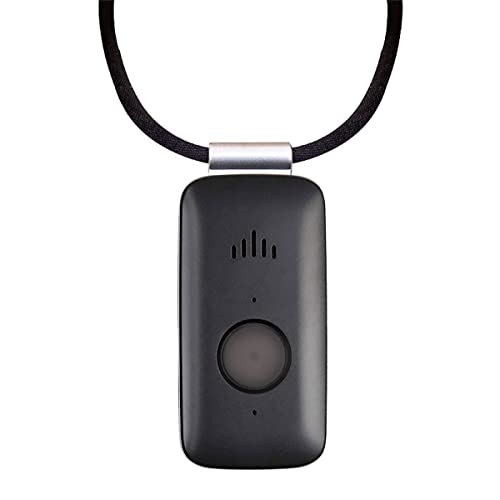
Mini Guardian 4G Medical Alert
4G, worn on the body, needs a plan
A small button worn on the body. Presses through to a monitoring centre.
Check price on Amazon
Medical Guardian MGHome Cellular
In-home base unit, needs a plan
An in-home unit for someone who does not go out much. No landline needed.
Check price on Amazon
These are supplies, not the job itself. Amazon does not sell the labour, the permit or the inspection.